Escapeburn SuperTerminal · beta for Windows

All your AI agents.
One window.

SuperTerminal runs the real Claude Code, Codex, Grok and Antigravity CLIs on the subscriptions you already have. They work side by side, each in its own git worktree, while you watch your quotas, resume conversations and dictate by voice.

  • no API keys
  • your existing CLI login
  • voice stays on your PC
real CLIs in one window
4
interface languages
15
quota refresh, no AI prompts
60 s
lines of history per session
5,000
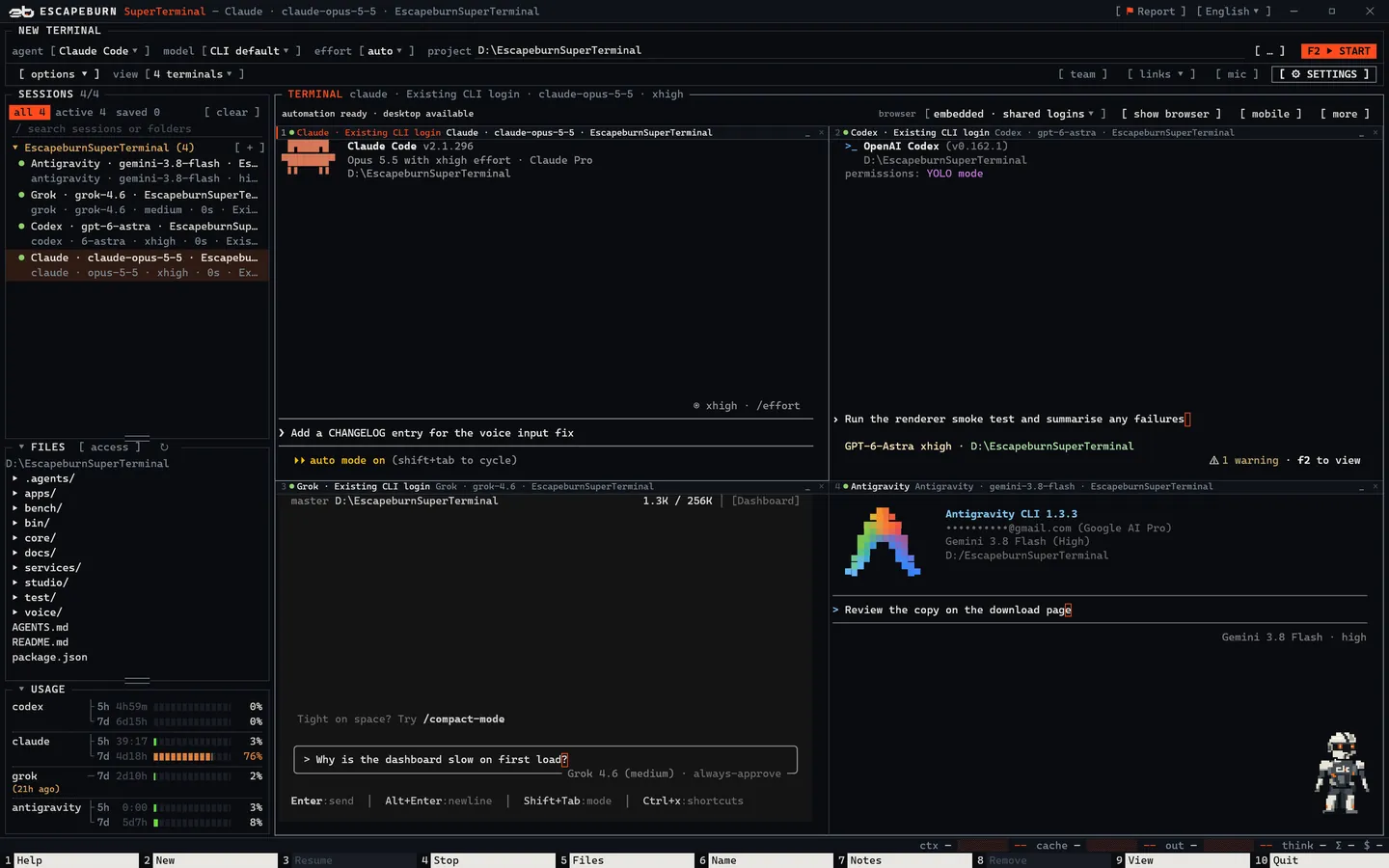
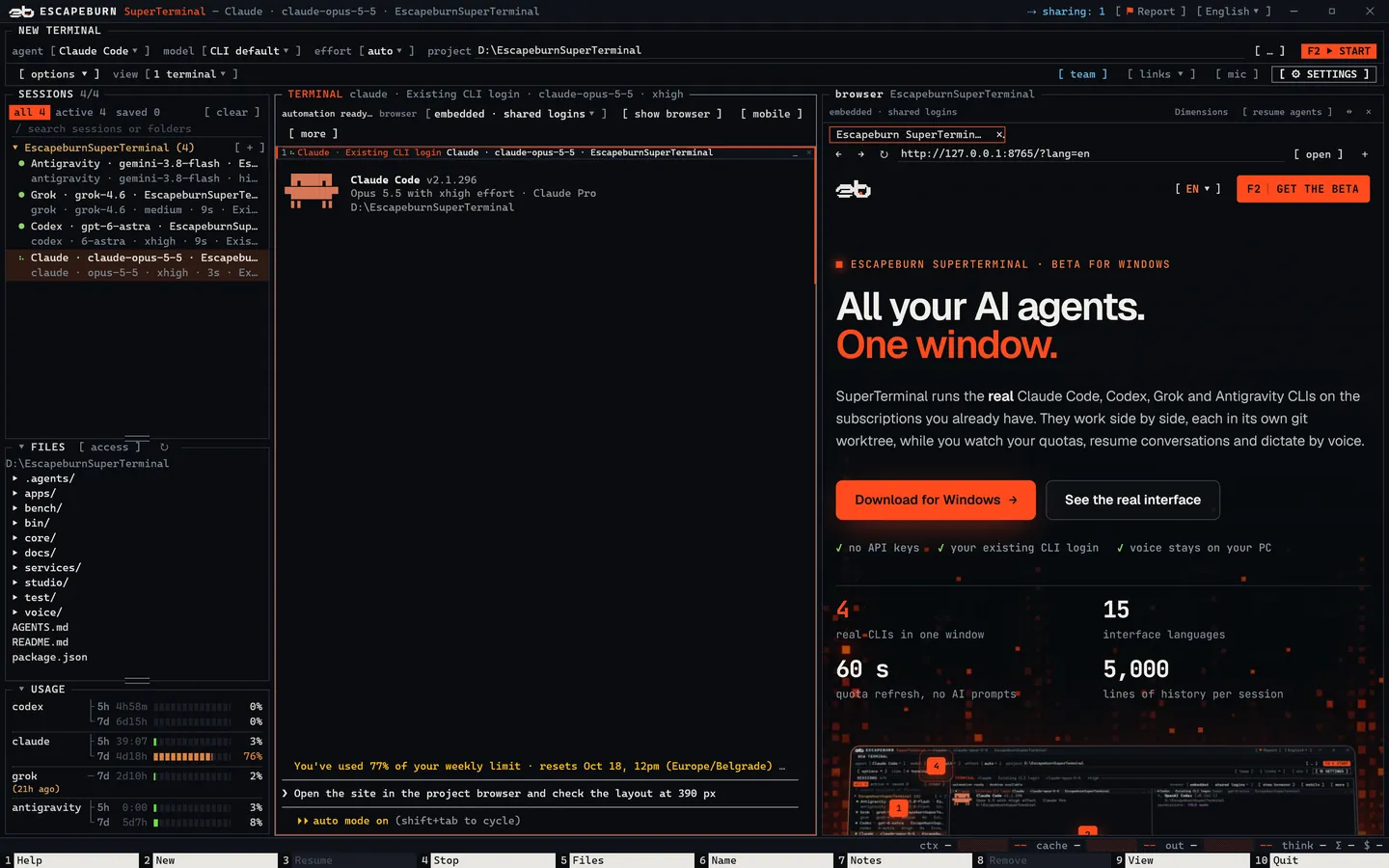
SuperTerminal window with Claude Code, Codex, Grok and Antigravity running side by side, the session list, file browser and subscription usage.
real interface Captured from the SuperTerminal renderer with four real CLIs open. The prompts are typed, not sent. Open full size ↗
  1. 1Sessions grouped by project: ● running, ○ saved.
  2. 2Real CLI TUIs, up to four at once. F9 switches the view.
  3. 3Quota for every subscription with reset countdowns.
  4. 4Pick agent, model and effort, then F2.
  5. 5Function keys in Midnight Commander style.
  6. 6Pixel, your personal agent.

Why SuperTerminal

Stop juggling terminals.

If you use more than one AI coding CLI, you know the mess. SuperTerminal keeps the tools you already trust and removes the friction around them.

Five windows, three CLIs, no overview.

Every agent in a tab of one window, shown 1, 2, 4 or all at once.

Two agents edit the same file and work gets lost.

Each session gets its own git worktree and branch; only verified work reaches your main checkout.

“How much quota do I have left?”

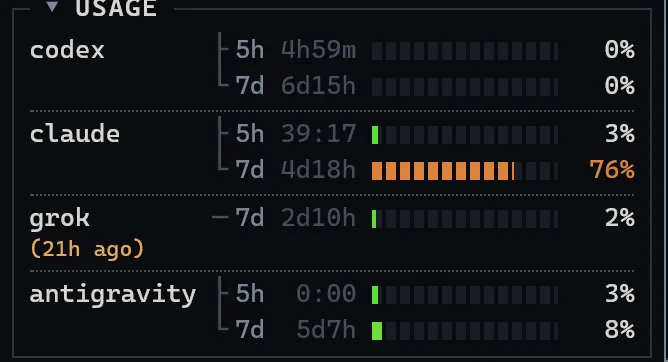
Usage windows for Claude, Codex, Grok and Antigravity stay visible, refreshed every 60 seconds without sending a single AI prompt.

Close the terminal and the context is gone.

Sessions stay in the sidebar with up to 5,000 lines of history, and F3 resumes the original CLI conversation.

Real CLIs

The real tools. Not an imitation.

You type straight into each CLI's own TUI. Native diffs, slash commands and plan limits stay exactly as the provider built them.

  • Pick model and effort directly, with full model IDs from the installed CLI's own catalog.
  • CLI missing? Install Claude Code, Codex, Grok or Antigravity from the app with one click.
  • Every session gets the same short rules: concise answers, focused reads and awareness of the app.
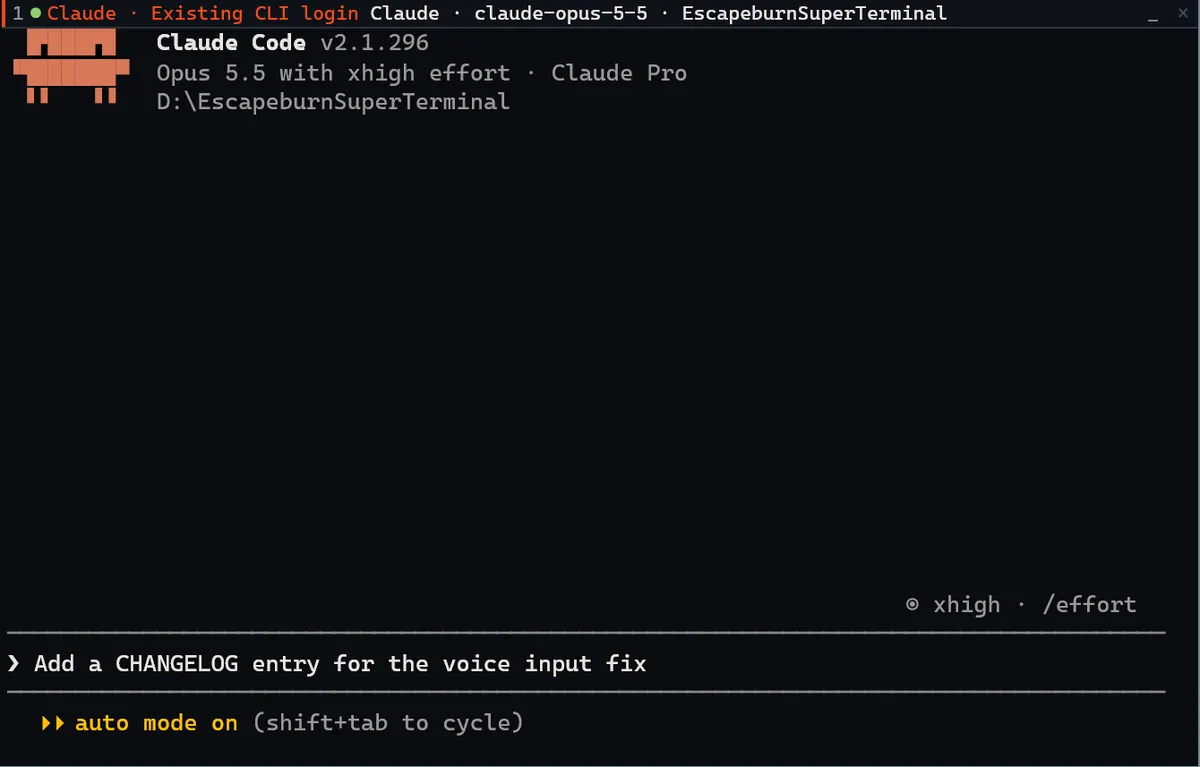
A real CLI running inside a SuperTerminal pane.

claude --permission-mode auto · D:\EscapeburnSuperTerminal

Parallel work

Parallel agents. No collisions.

In a git project every session, even the first, gets its own worktree and branch. Your main checkout only receives verified work.

main escapeburn/login-7f3aclaude escapeburn/docs-c21ecodex escapeburn/perf-9b04grok node bin/worktree.js status
  1. 01

    Each session, its own worktree

    Opening a terminal creates <project>.worktrees/<name>-<id> on branch escapeburn/<name>-<id>. node_modules is shared through a junction, so there is no new npm install.

  2. 02

    Agents work at the same time

    Claude fixes the login, Codex writes docs, Grok hunts a slow query. Each works in its own folder and never overwrites another's changes.

  3. 03

    Delivered with integrate

    Under a repository lock the branch is rebased onto the latest base and the base is fast-forwarded. Nothing is ever force-pushed.

  4. 04

    Conflict? Nothing breaks.

    The rebase is undone and the agent gets the list of files to resolve. Uncommitted changes in your main checkout are never overwritten.

Worktrees separate working files; they are not an OS sandbox. Shared node_modules, databases and ports stay shared.

Video Studio · beta

Edit any video with your agents, in the same window.

Switch it on in Settings, and Ctrl+Shift+S lays a full video editor over your workspace: YouTube videos, vlogs, presentations, product demos, shorts, music videos, whatever you have in mind. The terminal stays underneath as the AI dock, so Claude, Codex, Grok or Antigravity keep editing while you watch.

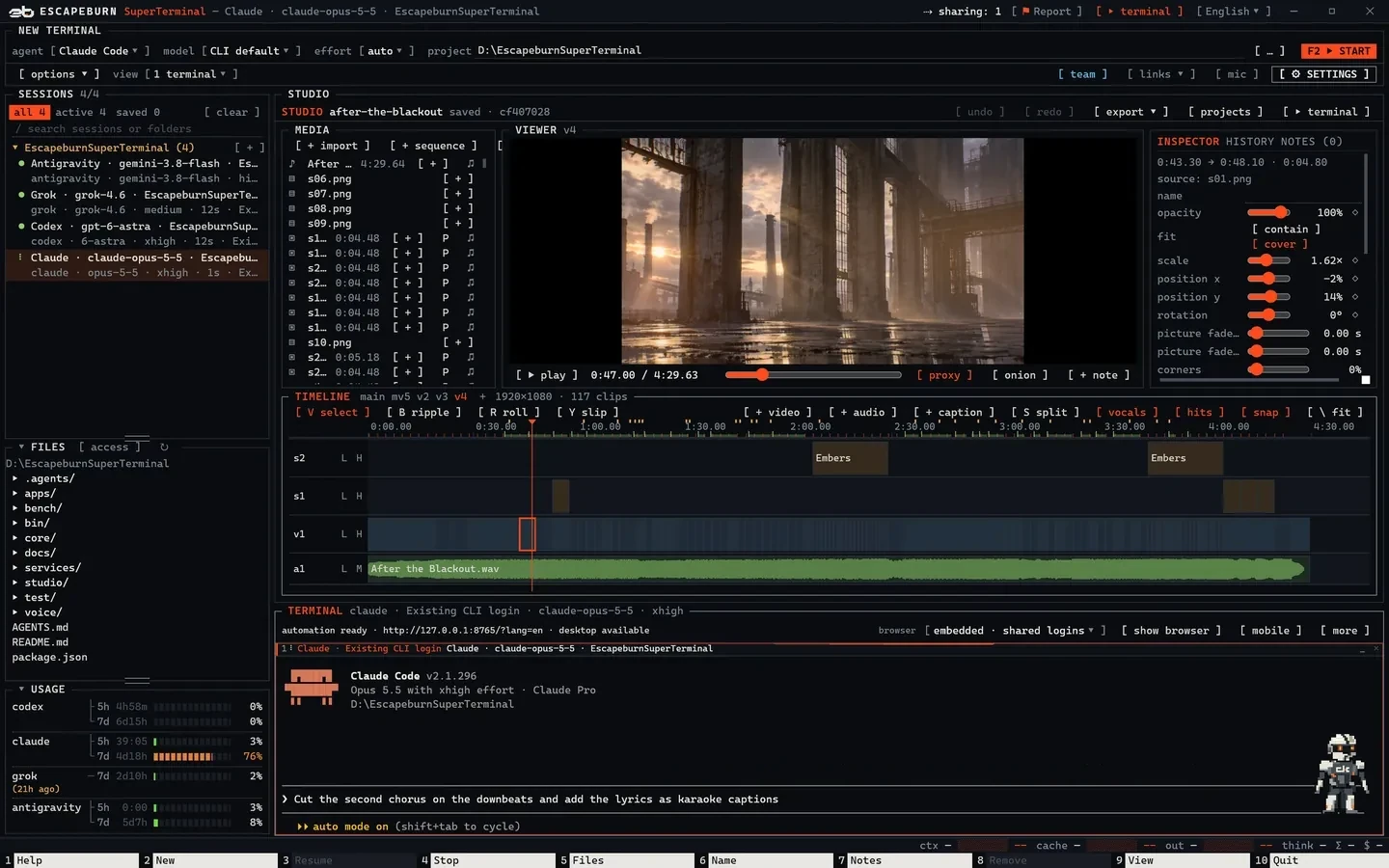
SuperTerminal in Studio mode: a music video project with viewer, inspector, media bin and timeline, and Claude Code docked below.
real interface Example: the real Studio with a real 4:30 music-video project of 117 clips, and Claude in the AI dock. The prompt is typed, not sent. Open full size ↗
  1. 1Viewer: preview and export come from the same compositor, frame by frame.
  2. 2Inspector: the selected clip's real properties and keyframes.
  3. 3Timeline: video, overlay and audio tracks; with a song, bars sit on the ruler and edges snap a frame before the beat.
  4. 4AI dock: the agent keeps working in its terminal below.

Frames from the finished render of the same project.

One studio for every kind of video

Built-in guides give the agents a proven workflow for each job; you approve the plan and the result.

  • 01

    YouTube and vlogs

    Fillers, stutters, long pauses and repeated takes are found in the transcript. Safe cuts go automatically, you decide the rest, and punch-in zooms hide the jump cuts.

    video.js guide talking-head
  • 02

    Explainers and presentations

    A director's plan with B-roll, charts and layouts in your colours and font. You approve the look before anything is made.

    video.js guide director
  • 03

    Product demos and ads

    Five beats from hook to call to action, a zoom on each feature, your URL on screen and an optional voiceover.

    video.js guide product-demo
  • 04

    Shorts and Reels

    A long video becomes vertical clips: candidates are ranked by hook and payoff, and you approve each one before it is published.

    video.js guide shorts
  • 05

    Music videos

    Treatment and storyboard, cuts on the song's phrases and beats, and karaoke lyrics placed on the sung words.

    video.js guide music-video
  • 06

    Stills that move

    Photos and generated images become shots: camera moves, light, particles and depth, layer by layer.

    video.js guide motion

Agents edit. Nothing gets overwritten.

Every agent changes the project through video.js operations tied to a revision. An edit made against an older version is refused, never applied blindly, and each change appears live in the Studio with the name of whoever made it.

Agents read the video first

Transcript with word timings, shot cuts and loudness, plus beats and bars for music, are computed on your PC with local Whisper large-v3 and signal analysis. Any model works from a compact text view instead of watching the footage.

A full editor's toolkit

Ripple, roll and slip edits, splits, transitions, J/L cuts, keyframes, speed ramps, colour grading, masks, titles and subtitles (SRT, WebVTT). By hand on the timeline, or by an agent through the same operations.

Notes on the frame, export for every channel

Mark a frame or a region and send the notes to the AI. Export for YouTube, Shorts or podcasts with normalised loudness; ffmpeg adds ProRes, DNxHR and FFV1 masters.

Pixel

A personal agent that runs your sessions, not your code.

Pixel lives in the corner of the window, or on top of your other apps. Tell it what you need and it hands the task to the right session or opens a new one. Approval cards let you check, and edit, a prompt before it goes out.

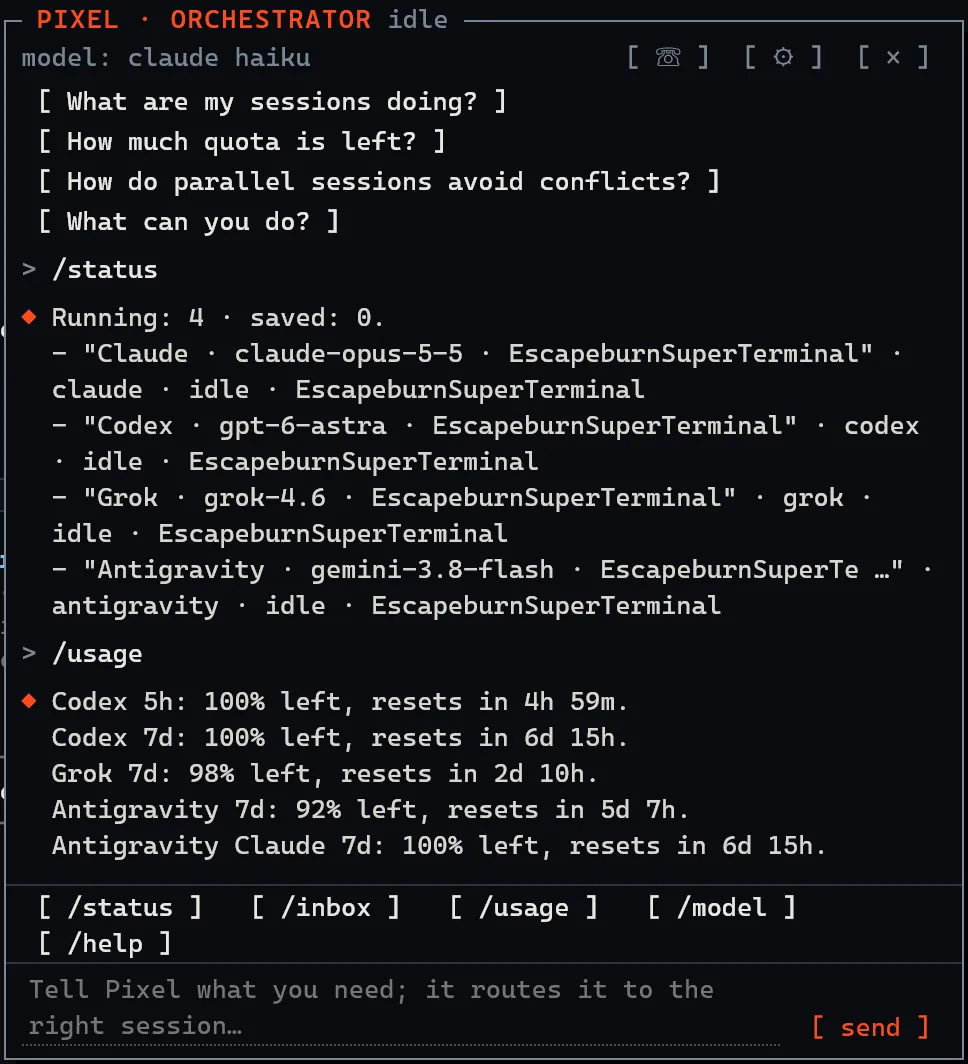
  • /status, /usage, /inbox and /help are answered by the app itself: no model call, no tokens.
  • It remembers what matters, keeps an agenda with reminders and quiet hours, and tells you when a session is done or waiting for you.
  • Talk to it: voice calls run on Codex realtime with a ChatGPT plan, or through local speech recognition and any of your subscriptions.
  • Optional connections: mail over IMAP, a calendar link (ICS) and GitHub.
  • It never reads or changes your code. Its model runs without tools, enforced by the app, not by a prompt.
Pixel chat panel answering /status with the four running sessions and /usage with the remaining quota.
real interface The answers come from the app's own code, from the same sessions and quotas as the window at the top of this page.

Team · beta

Work together. Everyone on their own plan.

Up to five people who trust each other form a team: offer projects with one click, add a shared team server and see who is online. Every member signs in to Claude, Codex, Grok or Antigravity with their own account.

  • Peer-to-peer over your network or an encrypted tunnel. No Escapeburn server sits in the data path.
  • Projects reach teammates as links, without typing codes; each teammate accepts or declines.
  • A team server runs your sessions on a shared Linux machine with your own subscription, isolated per session.
  • Invites are one-time codes valid for 10 minutes, confirmed on both screens with the same 6-digit number.

Subscriptions stay personal: SuperTerminal never shares a plan between people, because the providers' terms do not allow it.

Project browser

A browser your agents share and you control.

Every project gets a built-in browser next to the terminal. All agents of that project use the same tabs, one action at a time, while you watch the page change.

SuperTerminal with Claude Code on the left and the project browser on the right showing this website.
real interface This page, open in the project browser next to Claude. Open full size ↗
  • You stay in chargeTake control, pause or revoke access at any moment. Ctrl+Shift+F12 stops all automation.
  • Logins stay yoursShared sign-ins across projects or a private temporary profile. Agents never type passwords; logins, MFA and CAPTCHA are left to you.
  • Phone sizes and the desktopPick a device size to check a mobile layout. Full Windows desktop control works only for the exact app and window you approve.
  • Same tools in every CLIClaude and Codex get a small MCP server, Grok and Antigravity a command with the same tools. No extra AI calls.

Features

Everything around your agents. Nothing in their way.

Live quotas

Claude and Codex show 5-hour and 7-day usage, Grok its credit period, all with reset countdowns. Refreshed every 60 seconds without AI prompts; missing data stays “--” instead of being guessed.

SuperTerminal usage panel with quota bars for Codex, Claude, Grok and Antigravity.

Sessions that remember

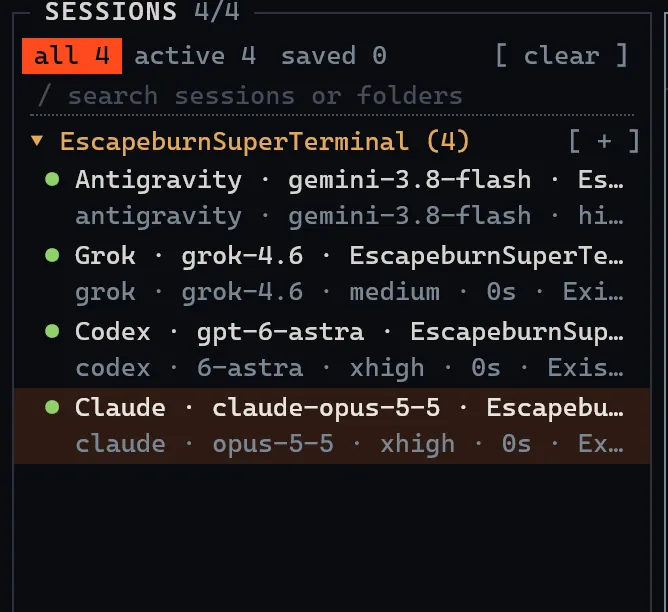
Every tab is saved locally with its screen, colours and up to 5,000 lines of history. Reopen the app and your tabs are back; F3 resumes the original conversation.

SuperTerminal session list grouped by project.

Voice without the cloud

Hold CapsLock and speak. Local Whisper large-v3 types the text straight into the terminal without pressing Enter, so you can edit before sending. No API key, and no audio leaves your PC.

You choose model and effort

Full model IDs from each CLI's own catalog, only the effort levels a model supports, and a custom model ID when you need one. No hidden profiles.

SuperTerminal launcher with agent, model, effort and project fields.

One project memory for every agent

A single AGENTS.md per folder that Claude, Codex and Grok all read. Decisions, progress and gotchas live in .agents/memory and are written through a tool that keeps the files short.

Agents that hand off work

Any session can open a new tab with a chosen agent and model, send it a task and get notified when it finishes. No ping-pong, no polling loops.

Android apps, right on screen

The mobile panel sets up the Android SDK with your approval, runs a managed emulator, builds and launches your React Native or Expo app, and lets agents tap through it. After the first boot it resumes in about 8 seconds.

MCP connectors you already have

Import the servers you set up for Claude Code, Codex or Gemini. Secrets go to an encrypted store, servers start on demand and each session gets one small connector entry instead of every server's tool catalog.

More than one account

Add a work and a personal login for Claude, Codex or Grok and pick the account for each terminal. Every saved session remembers its account.

Know when a session needs you

A quiet sound and a desktop notification when work is done or waiting for an answer, with an amber ! and a green ✓ in the session list.

A toolbelt in every session

Also built in and ready for your agents:

  • Image generation
  • Gemini search, video and audio understanding
  • Design and review tools
  • File editor next to the terminal

15 languages

The whole interface speaks your language. So does this page.

Shortcuts

Fast as Midnight Commander.

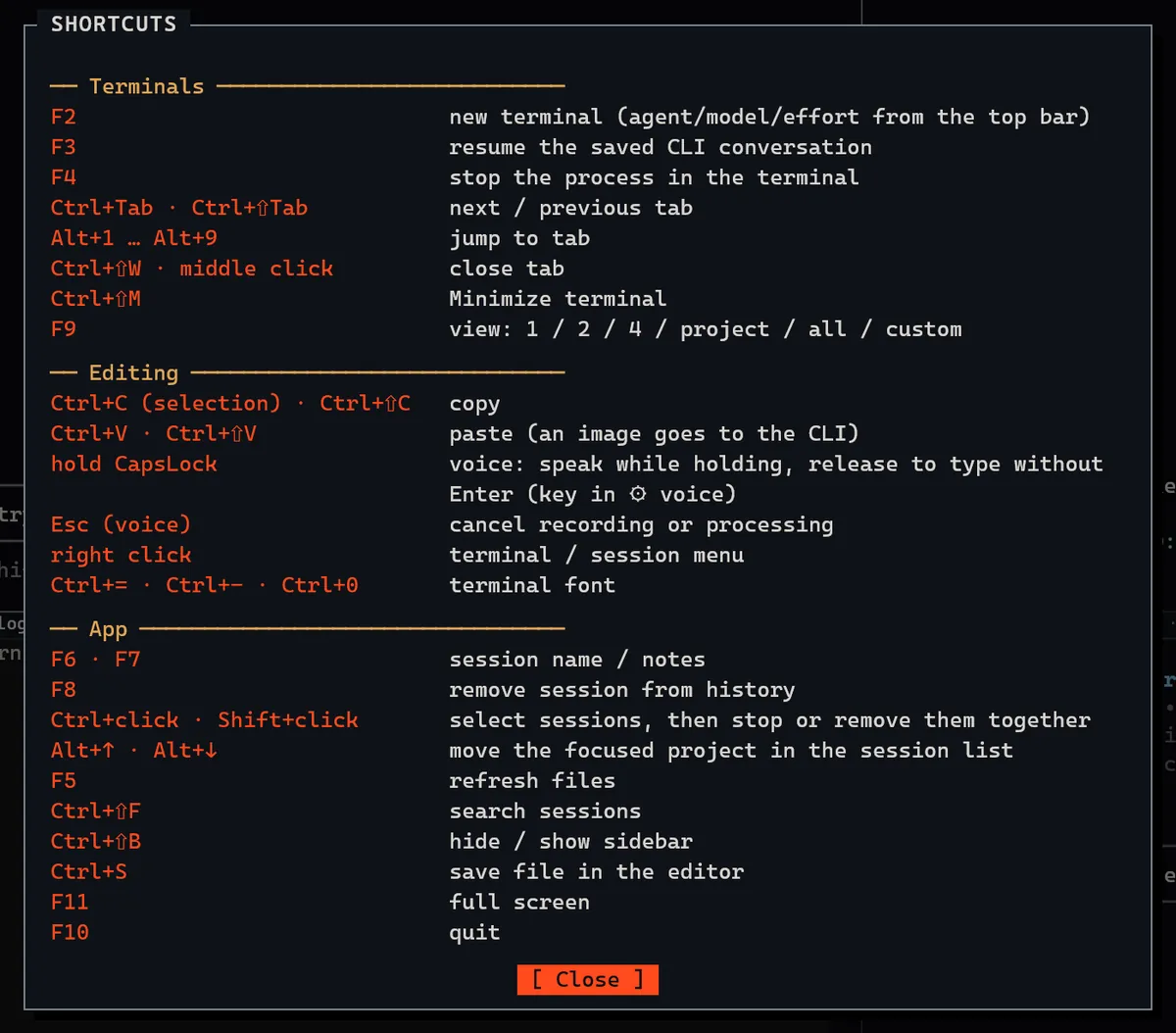
Function keys for what you do all day, the mouse everywhere else. Pick a key to see what it does.

F2 new terminal (agent/model/effort from the top bar)

Focus the bar and press F1–F10, or click a key.

The SuperTerminal shortcuts dialog opened with F1.

Privacy and honesty

Your subscription. Your computer. Your rules.

Get started

Up and running in minutes.

SuperTerminal is in beta for Windows. Access is approved per account.

  1. 1

    Create an Escapeburn account

    Sign up and confirm your email address.

  2. 2

    Request beta access

    Wait for approval or enter your invite code.

  3. 3

    Download and sign in

    Install SuperTerminal and sign in. If a CLI is missing, the app offers to install it for you.

Requires Windows and at least one CLI: Claude Code, Codex, Grok or Antigravity.

By downloading or using SuperTerminal, you agree to the Terms of Use and the Privacy Policy.